For users familiar with Octopus prior to the introduction of runbooks, an obvious question may be how are runbooks different to a deployment process? They are similar in many ways: a runbook process is a series of steps, which can reference packages and variables. The key differences are:
- No release needs to be created to execute a runbook.
- Lifecycles do not apply to runbooks.
- Runbook executions are not displayed on the deployment dashboards.
- Many runbooks can live in the same project, along with a deployment process.
- Runbooks have different roles and permissions to deployments.
Variables
A project’s variables are shared between the deployment process and any runbooks in the project (though specific values can be scoped exclusively to specific runbooks or to the deployment process). This means the following configurations can be shared between your deployment process and runbooks:
- Database connection strings
- Passwords
- Certificates
- Accounts
Current limitations
Scoping to Steps/Actions
- You cannot currently scope project variables to a deployment process step and a runbook process step, but we do aim to support this in the near future.
Environments
In Octopus 2020.2 and earlier, runbooks could be executed against any environment for which the user had an appropriately scoped RunbookRunCreate permission.
From Octopus 2020.3, it’s also possible to choose which environments a runbook can be run in by selecting this from the Run Settings in Runbook ➜ Settings:
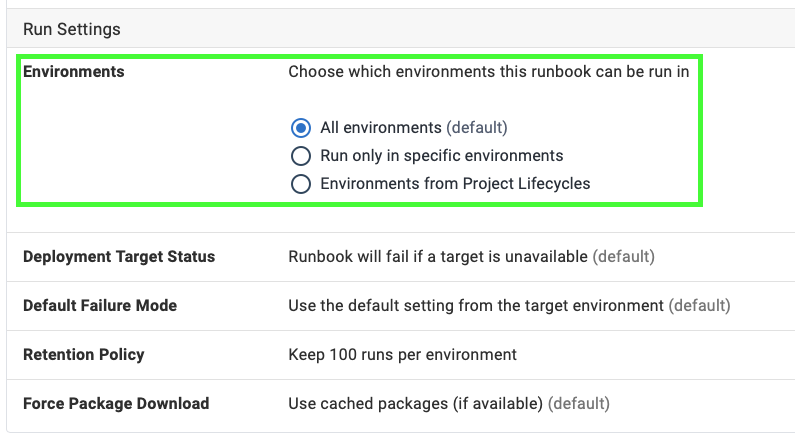
You can select the runbook to run in:
- All environments (the default).
- Only specific environments.
- Environments from the Project Lifecycle.
In Octopus 2020.2 and earlier, if you need to restrict the environment that a runbook can be executed in, you can achieve this by adding an Environment run condition in each step of the runbook process.
AI agent access
AI agent access controls whether AI agents can run a runbook. Use it to keep agents away from sensitive runbooks, such as ones that change production infrastructure, while still letting them run routine ones.
The setting sits below Environments in the Run Settings of Runbook ➜ Settings:
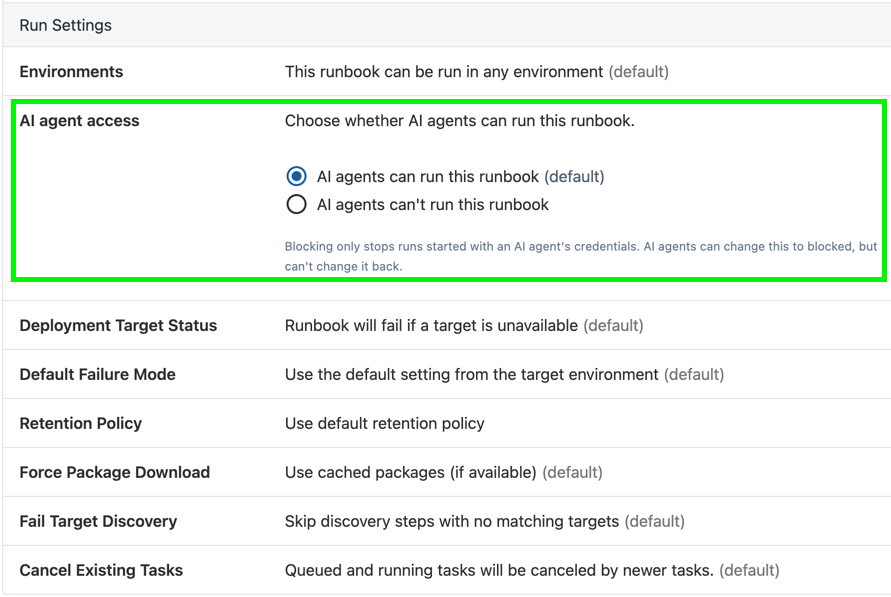
You can choose:
- AI agents can run this runbook (the default)
- AI agents can’t run this runbook
Blocking only applies to runs started with an AI agent’s credentials: an agent API key or an agent service account. This includes agents using the Octopus MCP server, and webhook triggers called with an agent API key. Runs started by users, scheduled triggers, and webhook triggers that use a shared secret aren’t affected.
When a runbook is blocked, Octopus rejects an agent’s run with an error before the run starts. Agents also see an empty list of environments for the runbook, so they don’t try runs that would fail.
AI agent access adds to runbook permissions rather than replacing them.
Agents can change the setting to block themselves, but they can’t change it back. To let agents run it again, a user or a non-agent service account needs to change the setting. In the API, the setting is the runbook’s AgentAccess property, set to Allowed or Blocked. If you leave AgentAccess out when you modify a runbook, Octopus keeps its current value.
AI agent access is an advisory control. It stops agents from running a runbook directly, but it isn’t a security boundary. Agents can get around it:
- An agent that can edit the runbook can still change its other settings, such as its environments.
- An agent can create a scheduled trigger or a shared-secret webhook trigger that runs the runbook. These runs use the Octopus system user, so they aren’t blocked.
- Octopus checks the setting when it creates a run. Runs an agent queued before the runbook was blocked still start, including runs scheduled for later.
- For Config as Code runbooks, an agent can run from a branch or commit where the setting still lets agents run the runbook.
For runbooks you want to protect, don’t give agents permission to edit runbooks (RunbookEdit) or triggers (TriggerCreate and TriggerEdit).
Retention policy
Project Lifecycles and their retention policies do not apply to runbooks (only deployments). From Octopus 2020.3, it’s possible to set a retention policy for a runbook by selecting this from the Run Settings in Runbook ➜ Settings:
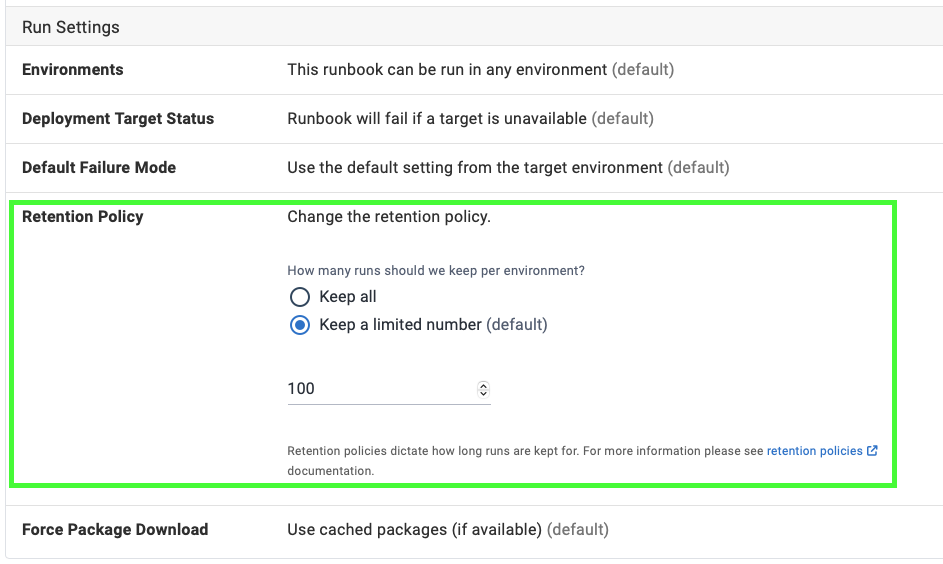
You can choose to:
- Keep all of the runbook runs.
- Keep a limited number of runbook runs (the default).
The retention policy is applied per environment. For example, if you had three environments, Development, Staging and Production and you set the retention policy limit to 10, that would keep a total of 30 runbook runs - 10 in each of Development, Staging and Production.
If you are using config-as-code runbooks, keep in mind that when a branch is deleted this includes any retention policies on that branch. The retention policy for any runbook runs made from that branch will then use the default time based retention policy (60 days).
In Octopus 2020.2 and earlier, the runbook retention policy could not be set. Instead, Octopus would keep the last 1000 runs.
Snapshots versus Releases
Config-as-code runbooks use commits instead of snapshots. If your project uses config-as-code runbooks, read about snapshots vs commits instead.
Runbooks are similar to deployments in that they also take a copy of the process to be used with execution. For a runbook this is referred to as a snapshot versus a release for a deployment. Runbooks can have two different types of snapshots:
- Draft
- Published
Package versions are included in a snapshot Similar to releases, the version of any packages that are used in the runbook are also snapshotted. This means if a newer version of the package is uploaded, and you wish to use it in your runbook, you will need to create a new snapshot of the runbook.
Version notes
- AI agent access for runbooks is available from Octopus 2026.4.9164.